Nederlandstalige versie · Version française
InnovMetric · 3D inspection software
PolyWorks|Inspector
PolyWorks|Inspector by InnovMetric is software for 3D dimensional inspection and quality analysis that works with devices from different brands, including FARO measuring arms, FARO laser trackers and Creaform scanners. CS Solutions supplies it together with your FARO CREAFORM hardware.
What is PolyWorks|Inspector?
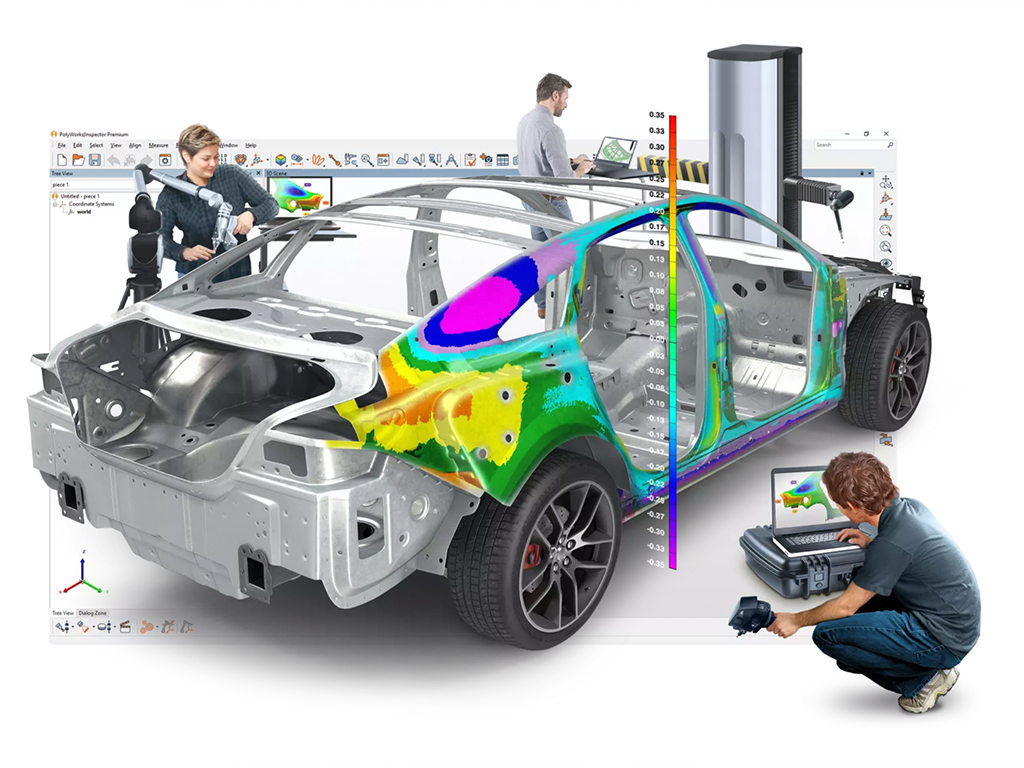
InnovMetric calls PolyWorks|Inspector a universal solution for 3D dimensional analysis and quality control. You measure by probing, by scanning or with a laser tracker, compare the result with the CAD model and check tolerances to GD&T. You read tolerances and PMI directly from the CAD file or from QIF.
Universal here means one software package for measuring arms, laser trackers, scanners and CNC CMMs (via I++), including devices from different brands. Your metrologists work in the same environment on every device, with the same reports.
Works with your FARO and Creaform devices
- FARO measuring armsProbing and scanning with a FaroArm, such as the Quantum X.
- FARO laser trackersMeasuring large parts and setups with a FARO Vantage.
- Creaform scannersHandheld scanners such as the HandySCAN and optically tracked systems such as the MetraSCAN. Since March 2026, data acquisition for FARO CREAFORM scanners has been fully built into PolyWorks|Inspector.
FARO and Creaform are both InnovMetric Global Partners. InnovMetric confirms support brand by brand, so feel free to ask us whether your model and version are supported.
What you do with it
- Inspection against the CAD modelCompare scans and probed points with the nominal geometry, using colour maps and dimensions.
- GD&T to ASME and ISOCheck form and position tolerances with algorithms certified by the German PTB.
- Reports and statisticsMeasurement reports, SPC and Gauge R&R (measurement system analysis) in the same software.
- Sharing resultsColleagues view projects free of charge with PolyWorks|Reviewer. With the free PolyWorks|Talisman app you control Inspector from your smartphone or tablet.
PolyWorks|Inspector comes in five packages: Premium, Standard, Probing++, Probing and Gauging. Which package you need depends on your devices and measurement tasks; we work that out with you.
PolyWorks|Inspector from CS Solutions
As a FARO CREAFORM distributor, we supply PolyWorks|Inspector together with your FARO measuring arm, laser tracker or Creaform scanner. If you add a device to an existing installation, we supply the extra licence. For renewing maintenance on an existing licence, we look at what is possible case by case.
Frequently asked questions about PolyWorks|Inspector
Can I buy PolyWorks|Inspector on its own, without a device?
Not from CS Solutions: we supply PolyWorks|Inspector together with FARO CREAFORM hardware, or as an extra licence when you buy an additional device.
Which devices does PolyWorks|Inspector work with?
According to InnovMetric, it works with FARO measuring arms and laser trackers, Creaform and FARO scanners, and CNC CMMs via I++, among others. The software also imports 38 point cloud formats.
Which languages is PolyWorks|Inspector available in?
The interface is available in English, French, German, Italian and Spanish, among others, but not in Dutch.
What computer do I need?
Windows 11 Pro or Windows 10 Pro (64-bit). From PolyWorks 2027, Windows 11 Pro is required. Processors with an ARM architecture and graphics cards from the GeForce range are not supported.
PolyWorks|Inspector or FARO CAM2?
Both work with FARO measuring arms, FARO laser trackers and Creaform scanners. FARO CAM2 is FARO's own software. PolyWorks|Inspector is brand-independent and worth considering if you want to use devices from different brands in one environment. We help you choose.
Can colleagues view the results without a licence?
Yes, with PolyWorks|Reviewer, InnovMetric's free viewer.